Download
Install Pyxi and join the beta.
Download, install, type your invite code. No API key, no payment, no admin rights. If Windows hesitates along the way, this page shows you exactly where to click.
-
Download the installer
Click Download for Windows and save
Pyxi-Setup.exe. If your browser says the file isn't commonly downloaded, open the download's menu and choose Keep. -
Open it, and tell Windows it's OK
The beta installer isn't code-signed yet, so Windows SmartScreen doesn't recognise the publisher and may show a blue Windows protected your PC box.
Click More info, check that the app is
Pyxi-Setup.exe, then click Run anyway.Windows protected your PCMicrosoft Defender SmartScreen prevented an unrecognized app from starting. Running this app might put your PC at risk.
More infoWindows protected your PCApp: Pyxi-Setup.exe
Publisher: Unknown publisher -
Pyxi installs and opens
It installs in one click for just your account, no admin rights needed. A little firefly appears beside your cursor and a slim glass notch sits on the top edge of your screen. Pyxi's voice downloads by itself the first time it opens.
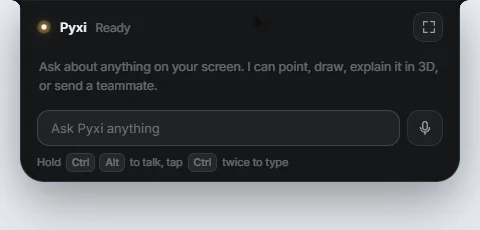
-
Open Settings
Press Ctrl Alt W, or click the Pyxi icon in the system tray, to open the notch. Click the expand button for the full panel, then choose Settings.
PyxiReady when you areChatTeamMemory3DVoiceSettings -
Join the Pyxi beta
At the top of Settings, under Join the Pyxi beta, type the invite code you were given and click Join. That's all. Pyxi now runs on the beta server, with a free daily allowance that resets at midnight UTC.
Invite codes come from the Pyxi team during the beta.
-
Say hey
Hold Ctrl Alt, ask about anything on your screen, and let go to send. Or tap Ctrl twice to type. A few to start with:
- What does this setting do?
- How does HTTPS work? Show me.
- Explain this chart
- Play Billie Jean, a bit quieter
- My desktop is a mess, organise it
If something's off
Quick fixes.
Nothing happens when I hold Ctrl Alt
Hold-to-talk uses the left Alt key, so AltGr typing never triggers it. You can also press Ctrl Alt Space to start and stop. If the microphone is blocked, the notch says so: allow Pyxi in Windows Settings, Privacy and security, Microphone.
I don't see "Join the Pyxi beta"
Make sure you're on the Settings tab of the full panel (the expand button in the notch). If you've already joined, the card says "You're in the beta" and shows today's allowance instead.
How do I stop Pyxi seeing my screen for a while?
Press Ctrl Alt P to pause all screen access, with a visible indicator. Press it again to resume.
How do I uninstall it?
Windows Settings, Apps, Installed apps, Pyxi, Uninstall. To remove your history too, delete the %APPDATA%\Pyxi folder. See the privacy policy for what's stored there.